
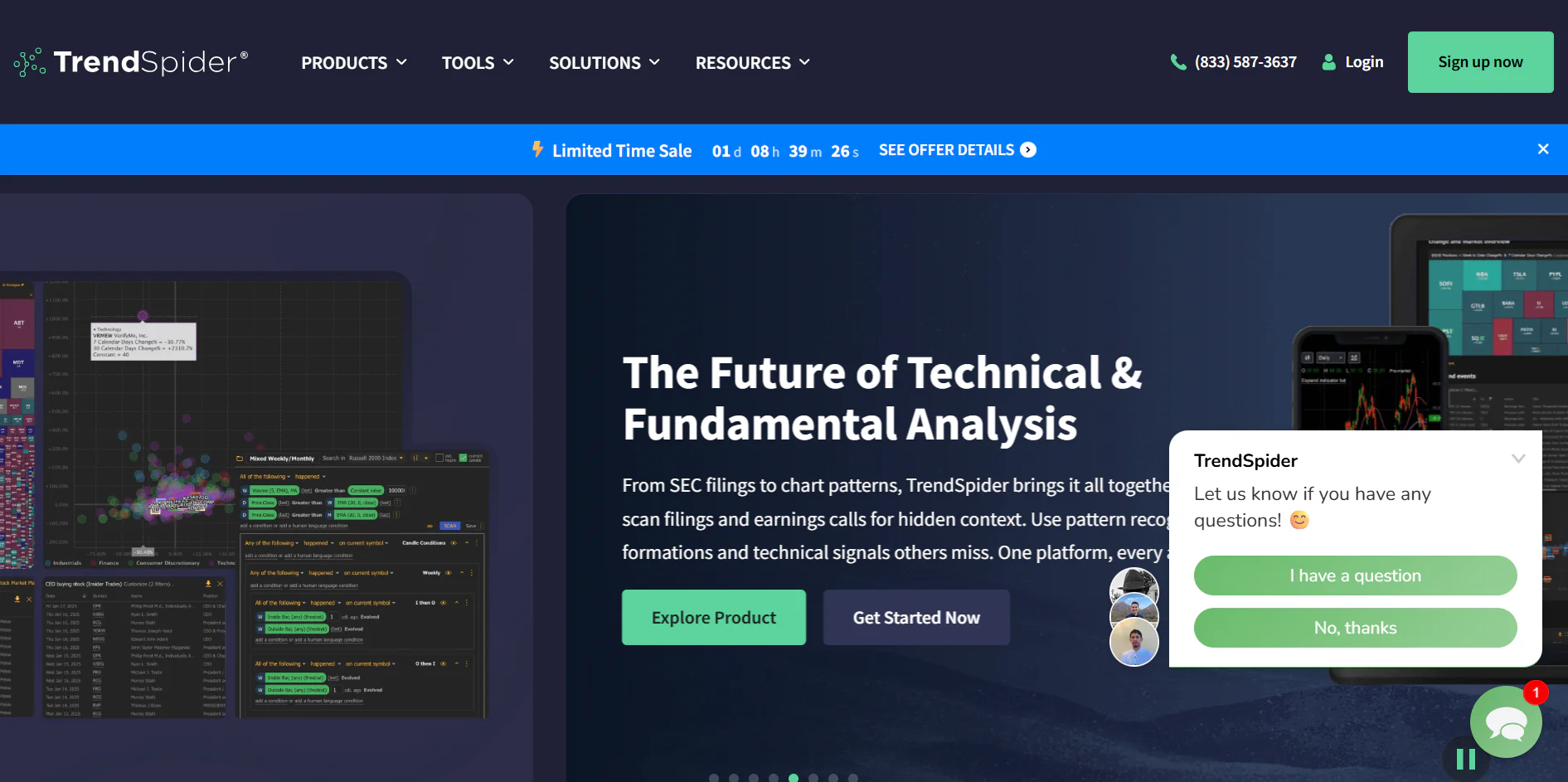
TrendSpider Review 2026 for Beginner Investors
Read our TrendSpider Review 2026 to discover its automation features, pricing, pros and cons, and whether it is the best automated market analysis platform for beginner investors looking to save time and improve investment research.
Table of Contents
- What Is TrendSpider?
- Why TrendSpider Is Different
- Who Should Use TrendSpider?
- TrendSpider Review: Quick Overview
- Why Investors Use TrendSpider
- How TrendSpider Uses Automation
- Is TrendSpider Good for Beginner Investors?
- Frequently Asked Questions
- Final Verdict
What Is TrendSpider?
If you’ve ever felt overwhelmed by chart analysis, market research, or technical analysis, you’re not alone.
Many investors spend hours reviewing charts, identifying trends, and searching for opportunities.
TrendSpider was created to help solve that problem.
In this TrendSpider Review, we’ll explore how the platform uses automation to simplify many of the tasks that traditionally require significant time and experience.
TrendSpider is a market analysis platform that combines:
- Automated chart analysis
- Trendline detection
- Pattern recognition
- Market scanning
- Alerts
- Multi-timeframe analysis
- Research automation
Unlike many traditional platforms, TrendSpider focuses heavily on reducing manual work.
This makes it particularly attractive to investors who want to improve efficiency without sacrificing research quality.
Why TrendSpider Is Different
Most investing platforms fall into one of two categories:
Analysis Platforms
Examples include:
- TradingView
- Thinkorswim
- MetaTrader
These platforms help investors analyze markets manually.
Screening Platforms
Examples include:
- Finviz
- Stock Rover
These platforms help investors discover opportunities.
TrendSpider sits somewhere in the middle.
The platform not only helps investors find opportunities but also automates parts of the analysis process.
This unique positioning is one reason TrendSpider has gained attention among both traders and long-term investors.
Recommended Additional Resource
Investors interested in understanding the foundations of technical analysis can explore the educational resources available through the SEC Investor Education Center at:
The SEC provides beginner-friendly guidance on investing principles, diversification, and market research.
Who Should Use TrendSpider?
A common misconception is that TrendSpider is only useful for advanced traders.
While experienced market participants certainly benefit from its automation features, many beginner investors can also find value in the platform.
Beginner Investors
TrendSpider can help beginners:
- Understand market structure
- Visualize trends
- Learn technical analysis concepts
- Save research time
- Build confidence
If you’re completely new to investing, we recommend first reading:
How to Start Investing in 2026
This guide provides the foundational investing knowledge that makes tools like TrendSpider easier to understand.
Self-Directed Investors
Investors who enjoy researching opportunities independently may appreciate TrendSpider’s ability to automate repetitive tasks.
Instead of manually drawing trendlines or scanning charts, the platform performs much of that work automatically.
Long-Term Investors
While TrendSpider is often associated with active market participants, long-term investors can also benefit from:
- Market monitoring
- Trend analysis
- Opportunity identification
- Portfolio research
Many successful investors use analysis tools not because they trade frequently, but because they want better information.
Investors Interested in AI and Automation
The investing world is increasingly adopting artificial intelligence and automation.
TrendSpider fits naturally into this trend.
For readers interested in technology-driven investing tools, we recommend:
Best AI Tools for Beginner Investors
FREE AI INVESTOR TOOLKIT
No spam.
TrendSpider Review: Quick Overview
Before diving deeper into the platform’s features, let’s summarize its strengths.
Overall Rating
9.2/10
Automation
10/10
Chart Analysis
9.5/10
Innovation
10/10
Educational Value
9/10
Beginner Friendliness
8.5/10
Value for Money
9/10
Why Investors Use TrendSpider
Many investors struggle with the same problem:
There is simply too much information.
Markets generate enormous amounts of data every day.
Trying to process everything manually can become overwhelming.
TrendSpider helps address this challenge through automation.
The Goal Is Not To Replace Investors
An important point often misunderstood is that TrendSpider does not make investment decisions for you.
Instead, the platform helps investors:
- Identify patterns
- Monitor markets
- Analyze trends
- Save time
Human judgment still matters.
Automation simply improves efficiency.
This philosophy aligns with the guidance provided by FINRA Investor Education:
Investors should use technology to support decision-making rather than blindly follow automated outputs.
How TrendSpider Uses Automation
Automation is the core feature that differentiates TrendSpider from competitors.
Traditionally, investors might spend hours:
- Drawing trendlines
- Identifying chart patterns
- Monitoring alerts
- Comparing timeframes
TrendSpider helps automate many of these tasks.
This allows investors to focus more on interpretation and less on repetitive work.
Why Automation Matters
Time is one of the most valuable resources investors have.
Automation can help:
- Improve efficiency
- Reduce manual errors
- Standardize analysis
- Increase consistency
For busy professionals and beginner investors, this can be particularly valuable.
TrendSpider and the Future of Investing
The broader investing industry continues to move toward automation.
Organizations such as Morningstar (https://www.morningstar.com) and Fidelity (https://www.fidelity.com/learning-center) regularly discuss how technology is reshaping investment research and portfolio management.
TrendSpider represents one example of this evolution.
Rather than replacing investors, technology increasingly acts as a research assistant.
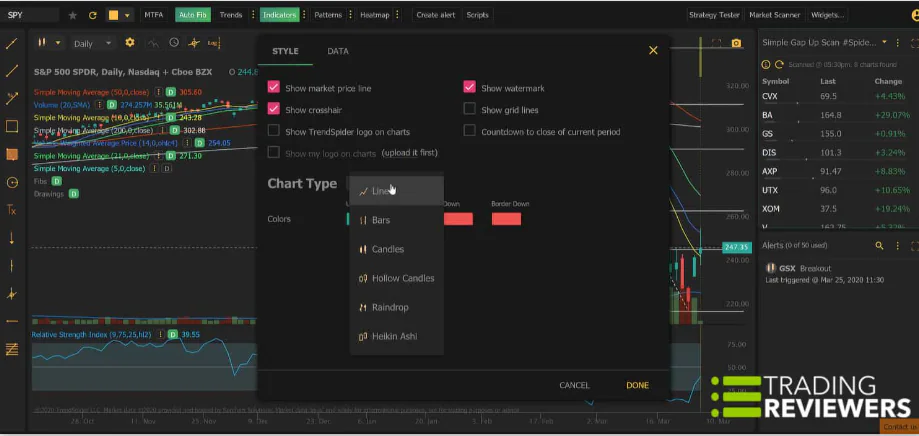
Try TrendSpider
If you’re looking for a platform that can automate parts of your market analysis and help you spend less time performing repetitive research tasks, TrendSpider is one of the most innovative investing tools available today.
TrendSpider Features Explained
The core value of TrendSpider is not simply that it provides charts.
Many platforms already do that.
The real value of TrendSpider lies in its ability to automate tasks that investors traditionally perform manually.
This automation can help investors save time, improve consistency, and reduce the risk of overlooking important information.
Let’s explore the features that make TrendSpider unique.
Automated Trendlines
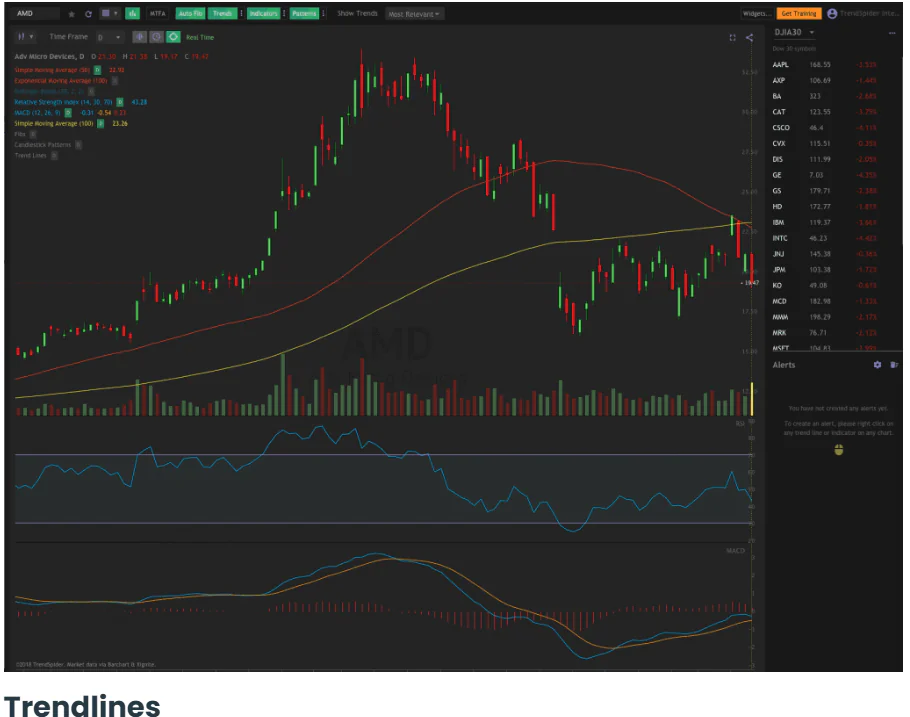
One of TrendSpider’s most recognized features is its automated trendline technology.
Traditionally, drawing trendlines requires investors to:
- Identify price swings
- Select chart points
- Draw lines manually
- Adjust those lines as new data appears
This process can be subjective.
Different investors often draw different trendlines on the same chart.
How TrendSpider Solves This Problem
TrendSpider automatically identifies potential trendlines based on price action.
Instead of spending time drawing lines manually, investors can immediately see areas that may deserve attention.
This helps:
- Save time
- Improve consistency
- Reduce human bias
Why Automated Trendlines Matter
For beginner investors, trendlines can initially seem intimidating.
Automation makes these concepts more accessible.
Rather than learning complex drawing techniques immediately, investors can focus on understanding what trendlines actually represent.
For readers interested in understanding broader market behavior, we also recommend:
Automated Pattern Recognition
Pattern recognition is another area where TrendSpider stands out.
Many investors spend hours searching for chart patterns such as:
- Triangles
- Channels
- Wedges
- Breakouts
- Reversals
TrendSpider automates much of this process.
Why Pattern Recognition Is Useful
Patterns can help investors:
- Understand market structure
- Identify potential opportunities
- Improve research efficiency
However, manually finding patterns across hundreds of charts can be time-consuming.
TrendSpider helps reduce that workload.
Important Reminder
No pattern guarantees future performance.
Investors should always combine pattern analysis with:
- Fundamental research
- Diversification
- Risk management
The educational resources provided by Investopedia (https://www.investopedia.com) offer excellent explanations of common chart patterns and technical analysis concepts.
Multi-Timeframe Analysis
One challenge investors often face is comparing different timeframes.
For example:
A stock might look strong on a daily chart but weak on a weekly chart.
Understanding multiple perspectives is important.
How TrendSpider Helps
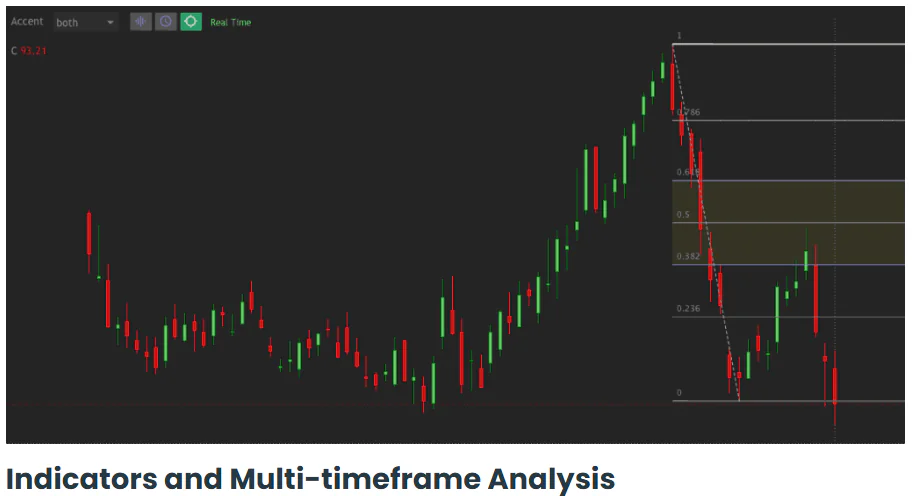
TrendSpider allows users to analyze multiple timeframes simultaneously.
This can help investors:
- Identify broader trends
- Confirm market signals
- Improve decision-making
Why Multi-Timeframe Analysis Matters
Successful investing often requires context.
Looking at a single chart timeframe may provide an incomplete picture.
TrendSpider simplifies the process of comparing:
- Daily trends
- Weekly trends
- Monthly trends
all within a unified workflow.
Market Scanners
Another powerful feature highlighted throughout this TrendSpider Review is the platform’s market scanners.
Scanners allow investors to search thousands of securities based on specific conditions.
Examples include:
- Trendline breakouts
- Moving average crossovers
- Relative strength conditions
- Price action events
Why Market Scanners Matter
Without scanners, investors may need to manually review hundreds or thousands of charts.
TrendSpider automates much of this process.
As a result:
- Research becomes faster.
- Opportunities become easier to discover.
- Analysis becomes more consistent.
TrendSpider vs Traditional Screening
Unlike traditional stock screeners that focus heavily on fundamentals, TrendSpider’s scanners emphasize technical and market behavior conditions.
This makes the platform particularly appealing to investors interested in chart-based research.
For readers interested in more traditional stock screening, see:
FREE AI INVESTOR TOOLKIT
No spam.
Smart Alerts
Monitoring markets continuously is not realistic for most investors.
Many people:
- Work full-time jobs
- Manage businesses
- Have family responsibilities
This is where TrendSpider’s alert system becomes valuable.
What Can Alerts Monitor?
Examples include:
- Price levels
- Trendline interactions
- Indicator signals
- Pattern events
Instead of constantly watching charts, investors can allow TrendSpider to notify them when relevant events occur.
Why Alerts Improve Discipline
Alerts help reduce emotional market monitoring.
Rather than checking charts repeatedly, investors can focus on predefined conditions.
This aligns closely with the investing mindset principles discussed in:
How to Build a Strong Investment Mindset Before You Start Investing
Strategy Testing and Backtesting
One feature that distinguishes TrendSpider from many competitors is strategy testing.
Backtesting allows investors to evaluate how a strategy would have performed historically.
Why Backtesting Matters
Many investing ideas sound promising.
Backtesting helps answer an important question:
“Would this approach have worked historically?”
While past performance never guarantees future results, historical testing can provide useful context.
The educational resources available through Vanguard Investor Education (https://investor.vanguard.com/investor-resources-education) emphasize the importance of evaluating investment approaches systematically rather than relying on assumptions.
AI-Powered Features
As investing technology evolves, artificial intelligence continues to play a larger role.
TrendSpider incorporates automation and AI-inspired features to help investors:
- Analyze charts
- Detect patterns
- Monitor opportunities
- Improve efficiency
This makes the platform a natural extension of the concepts discussed in:
Best AI Tools for Beginner Investors
Is TrendSpider Actually AI?
This is a common question.
TrendSpider does not replace investor judgment.
Instead, it uses automation and intelligent systems to assist with analysis.
Think of it as:
A research assistant
rather than
an investment advisor.
Real Beginner Investor Use Cases
Scenario 1: Learning Technical Analysis
Goal:
Understand trends and market structure.
TrendSpider helps by automating trendlines and chart analysis.
Scenario 2: Monitoring ETFs
Goal:
Track long-term investment opportunities.
TrendSpider helps identify significant trend changes and market conditions.
Scenario 3: Research Efficiency
Goal:
Reduce time spent analyzing charts.
TrendSpider automates repetitive research tasks.
Scenario 4: Building Investing Confidence
Goal:
Make more informed decisions.
TrendSpider provides additional context and structure for analysis.
Why Some Investors Use TrendSpider Alongside TradingView and Finviz
Many investors eventually discover that these tools complement one another.
Finviz
Best for:
Finding opportunities.
TradingView
Best for:
Analyzing opportunities.
TrendSpider
Best for:
Automating analysis.
Together, these platforms can create a highly effective investing workflow.
Try TrendSpider
If you’re looking for a platform that can help automate research, identify opportunities more efficiently, and reduce the amount of manual chart analysis required, TrendSpider remains one of the most innovative investing tools available.
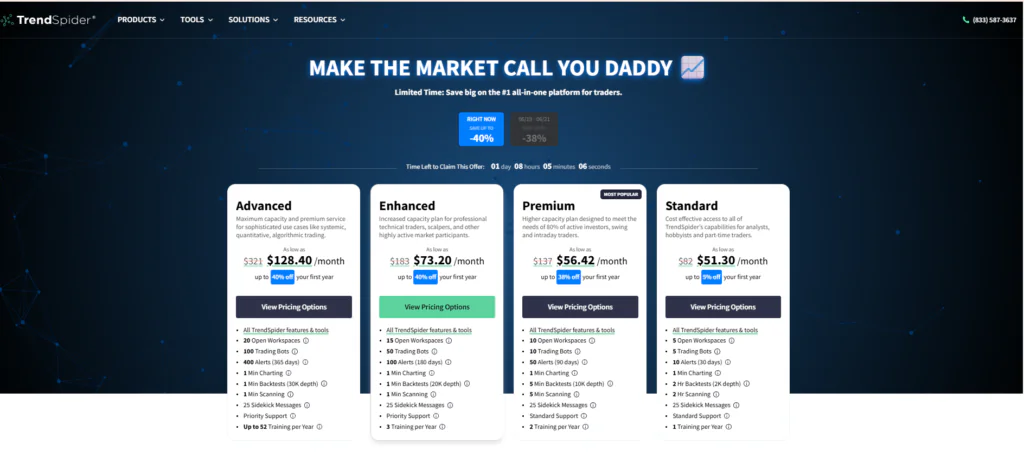
TrendSpider Pricing: Is TrendSpider Worth the Cost?
One of the first questions many investors ask during a TrendSpider Review is:
“Is TrendSpider worth paying for?”
The answer depends on your investing goals, research style, and how much value you place on automation.
Unlike many basic charting platforms, TrendSpider positions itself as a premium market analysis tool.
Its pricing reflects the advanced automation features available.
TrendSpider Plans Overview
TrendSpider typically offers multiple subscription tiers designed for different types of investors.
As plans evolve over time, it is always advisable to verify current pricing directly on the official website.
The main differences between plans generally involve:
- Number of alerts
- Scanner capabilities
- Strategy testing
- Multi-timeframe analysis
- Data access
- Automation features
Who Gets the Most Value?
TrendSpider tends to deliver the highest value to:
Self-Directed Investors
Investors who enjoy conducting their own research.
Active Market Researchers
People who regularly analyze opportunities and monitor trends.
Investors Interested in Automation
Individuals who want to reduce repetitive chart analysis.
Is TrendSpider Too Advanced for Beginners?
Not necessarily.
Many beginners initially assume TrendSpider is only for experienced traders.
However, automation can actually simplify certain tasks.
The challenge is that new investors still need to understand the concepts behind the analysis.
This is why educational resources such as the SEC Investor Education Center and FINRA Investor Education remain valuable companions when learning to use advanced investing tools.
TrendSpider Pros and Cons
No investing platform is perfect.
A balanced TrendSpider Review should consider both strengths and limitations.
TrendSpider Pros
Industry-Leading Automation
Few platforms automate market analysis as effectively.
Automated Trendlines
Reduces manual chart work significantly.
Pattern Recognition
Helps investors identify opportunities faster.
Powerful Market Scanners
Makes opportunity discovery more efficient.
Multi-Timeframe Analysis
Provides broader market context.
Strong Innovation
TrendSpider continues to push investing technology forward.
Excellent Research Efficiency
Can save substantial time compared to manual analysis.
TrendSpider Cons
Learning Curve
Beginners may initially feel overwhelmed.
Premium Pricing
More expensive than many traditional platforms.
Less Beginner-Friendly Than TradingView
TradingView generally offers a smoother entry point.
Not a Substitute for Education
Automation supports research but does not replace investing knowledge.
For educational support, investors can benefit from resources available through Fidelity’s Learning Center and Vanguard Investor Education.
TrendSpider vs TradingView
This comparison appears frequently in online discussions.
The reality is that these platforms serve different purposes.
TradingView
Best For:
- Visual chart analysis
- Market monitoring
- Community learning
- ETF analysis
- Beginner investors
TrendSpider
Best For:
- Automation
- Research efficiency
- Pattern recognition
- Strategy testing
- Advanced workflows
Which Platform Is Better?
If your goal is:
Learning and analyzing markets
TradingView generally wins.
If your goal is:
Automating market analysis
TrendSpider often wins.
TrendSpider vs Finviz
This comparison is equally important.
Finviz
Best For:
- Discovering opportunities
- Stock screening
- Market heatmaps
- Fundamental research
TrendSpider
Best For:
- Automated analysis
- Technical workflows
- Pattern recognition
- Strategy testing
Which Platform Is Better?
If you need help finding opportunities:
Finviz wins.
If you need help analyzing opportunities automatically:
TrendSpider wins.
TrendSpider vs TradingView vs Finviz
| Feature | TrendSpider | TradingView | Finviz |
|---|---|---|---|
| Automation | ⭐⭐⭐⭐⭐ | ⭐⭐ | ⭐⭐ |
| Chart Analysis | ⭐⭐⭐⭐⭐ | ⭐⭐⭐⭐⭐ | ⭐⭐⭐ |
| Stock Screening | ⭐⭐⭐⭐ | ⭐⭐⭐⭐ | ⭐⭐⭐⭐⭐ |
| ETF Research | ⭐⭐⭐⭐ | ⭐⭐⭐⭐⭐ | ⭐⭐⭐⭐ |
| Pattern Recognition | ⭐⭐⭐⭐⭐ | ⭐⭐⭐ | ⭐⭐ |
| Alerts | ⭐⭐⭐⭐⭐ | ⭐⭐⭐⭐⭐ | ⭐⭐⭐ |
| Beginner Friendliness | ⭐⭐⭐ | ⭐⭐⭐⭐⭐ | ⭐⭐⭐⭐ |
| Community Features | ⭐ | ⭐⭐⭐⭐⭐ | ⭐ |
| Mobile Experience | ⭐⭐⭐ | ⭐⭐⭐⭐⭐ | ⭐⭐ |
| Free Version | ⭐⭐ | ⭐⭐⭐⭐⭐ | ⭐⭐⭐⭐⭐ |
Which Platform Should You Choose?
Choose TrendSpider If:
✔ You want automation.
✔ You analyze charts frequently.
✔ You want to save research time.
✔ You value advanced workflows.
Choose TradingView If:
✔ You’re a beginner investor.
✔ You want exceptional charts.
✔ You enjoy visual analysis.
✔ You want community insights.
Choose Finviz If:
✔ You want to find opportunities.
✔ You prefer stock screening.
✔ You focus on fundamentals.
Who Should NOT Use TrendSpider?
TrendSpider may not be the ideal platform if:
- You are looking for the cheapest solution.
- You want a very simple investing experience.
- You have no interest in technical analysis.
- You prefer passive investing without market research.
In those situations, simpler tools may provide better value.
Related Reviews
⭐ Our Verdict: Is TrendSpider Worth It in 2026?
After evaluating:
- Automation
- Chart analysis
- Research efficiency
- Innovation
- Pricing
- Educational value
our conclusion is clear.
Overall Rating
⭐⭐⭐⭐⭐ 9.2/10
TrendSpider is one of the most innovative investing platforms available today.
Its ability to automate trendlines, pattern recognition, alerts, scanners, and strategy testing creates a powerful research environment.
For investors willing to invest time learning the platform, the productivity benefits can be significant.
Best For
✔ Self-Directed Investors
✔ Active Researchers
✔ Technical Analysis Enthusiasts
✔ Investors Interested in Automation
✔ Advanced Market Analysis
Less Suitable For
✘ Investors seeking maximum simplicity
✘ Completely passive investors
✘ Investors unwilling to learn analysis concepts
Final Recommendation
If your goal is to reduce manual research and improve analytical efficiency, TrendSpider is one of the strongest tools available.
Try TrendSpider
If you’re ready to automate parts of your investing research and explore one of the most innovative market analysis platforms available, TrendSpider is worth considering.
Why We Recommend TrendSpider
✔ Industry-Leading Automation
✔ Advanced Pattern Recognition
✔ Powerful Market Scanners
✔ Strategy Testing
✔ Multi-Timeframe Analysis
✔ Research Efficiency
FAQ
Is TrendSpider good for beginners?
Yes, but beginners should expect a learning curve.
The platform becomes more valuable as investing knowledge grows.
Is TrendSpider better than TradingView?
It depends on your goal.
TradingView is generally better for learning and visual analysis.
TrendSpider excels in automation.
Is TrendSpider better than Finviz?
For automated analysis, yes.
For stock discovery and screening, Finviz remains exceptionally strong.
Does TrendSpider use AI?
TrendSpider uses automation and intelligent analysis systems to assist investors.
However, it does not replace investor judgment.
Is TrendSpider worth the money?
For investors who actively research markets and value automation, many users consider it worth the investment.
Can TrendSpider help long-term investors?
Yes.
Long-term investors can use TrendSpider to monitor trends, analyze opportunities, and improve research efficiency.
Final Thoughts
TrendSpider occupies a unique position within the investing tools landscape.
While TradingView focuses on chart analysis and Finviz focuses on opportunity discovery, TrendSpider specializes in automation.
This specialization allows investors to spend less time performing repetitive tasks and more time making informed decisions.
For investors interested in combining technology, efficiency, and market research, TrendSpider remains one of the most compelling platforms available in 2026.
Want More Investing Tools, Reviews, and Beginner-Friendly Guides?
Join the InvestSmartEdge newsletter and receive:
✔ Investing education
✔ Wealth-building strategies
✔ Platform reviews
✔ Beginner investing guides
✔ Market insights
directly in your inbox.
FREE AI INVESTOR TOOLKIT
No spam.
Author:
Mario Cazombo
Mario Cazombo is the founder of InvestSmartEdge and a financial education writer focused on helping beginner investors understand investing, wealth building, market research, investing psychology, and investing tools.
His mission is to help readers learn investing with more confidence and less confusion.
Disclaimer
Invest Smart Edge provides educational content for informational purposes only and does not provide investment, legal, tax, or financial advice.
All investments involve risk, including the possible loss of principal. Past performance does not guarantee future results.
Always conduct your own research and consider consulting a qualified financial professional before making investment decisions