TradingView Review 2026 for Beginner Investors
Read our TradingView Review 2026 to discover its features, pricing, pros and cons, and whether it is the best charting platform for beginner investors looking to improve market analysis and investment decisions.
Table of Contents
- What Is TradingView?
- Why TradingView Has Become So Popular
- Who Should Use TradingView?
- TradingView Review: Quick Overview
- Why Beginner Investors Use TradingView
- TradingView’s Biggest Advantages
- Is TradingView Good for Long-Term Investors?
- Frequently Asked Questions
- Final Verdict
What Is TradingView?
If you’ve spent any time researching investing platforms, stock analysis tools, or charting software, you’ve probably come across TradingView.
Today, TradingView is one of the most widely used market analysis platforms in the world.
It provides:
- Advanced charting tools
- Stock screeners
- ETF analysis
- Market data
- Technical indicators
- Watchlists
- Alerts
- Community insights
Unlike many platforms designed exclusively for professional traders, TradingView is surprisingly accessible for beginners.
This accessibility is one of the reasons why it has become a favorite among:
- Beginner investors
- ETF investors
- Swing traders
- Long-term investors
- Financial educators
For beginners learning how markets work, TradingView can serve as both a research platform and an educational tool.
If you’re completely new to investing, we recommend first reading:
How to Start Investing in 2026
This guide explains the investing fundamentals that TradingView can help you apply in practice.
Why TradingView Has Become So Popular
The popularity of TradingView is not an accident.
Most charting platforms historically suffered from several problems:
- Complicated interfaces
- Expensive subscriptions
- Limited market coverage
- Poor user experience
TradingView changed that.
The platform introduced:
Modern Cloud-Based Technology
Because TradingView runs directly in your browser, you can access your charts from virtually any device.
No complicated software installation is required.
Professional-Level Charts
TradingView provides charting capabilities that rival many institutional platforms.
Investors can analyze:
- Stocks
- ETFs
- Forex
- Commodities
- Bonds
- Cryptocurrencies
- Global indices
all from a single dashboard.
Massive User Community
One feature that separates TradingView from many competitors is its community.
Millions of users publish:
- Market ideas
- Analysis
- Educational content
- Trading strategies
This creates an environment where beginners can learn from more experienced market participants.
Who Should Use TradingView?
One of the most common misconceptions is that TradingView is only for active traders.
In reality, the platform serves multiple audiences.
Beginner Investors
TradingView can help beginners:
- Understand market behavior
- Follow ETFs
- Monitor stocks
- Learn chart basics
- Build investing confidence
Long-Term Investors
Many long-term investors use TradingView to:
- Track portfolio holdings
- Analyze trends
- Compare investments
- Monitor market conditions
Long-term investors looking to compare investment performance can also explore market research tools available through Morningstar.
ETF Investors
ETF investors can use TradingView to analyze:
- S&P 500 ETFs
- Dividend ETFs
- Growth ETFs
- International ETFs
This is particularly useful for readers of:
Investors researching ETFs may also benefit from the educational resources offered by Vanguard Investor Education and the Fidelity Learning Center.
Self-Directed Investors
Investors who enjoy researching opportunities independently often benefit from TradingView’s extensive research capabilities.
TradingView Review: Quick Overview
Before diving deeper into the platform’s features, here’s a quick summary.
Overall Rating
9.5/10
Ease of Use
9/10
Charting Tools
10/10
Educational Value
10/10
Beginner Friendliness
9/10
Pricing
8.5/10
Value for Money
9.5/10
Why Beginner Investors Use TradingView
Many beginner investors initially feel overwhelmed by market data.
Questions such as:
- Which ETF should I choose?
- Is this stock trending higher?
- How do I compare investments?
- What is market sentiment?
can seem intimidating.
TradingView helps simplify these questions through visual analysis.
Instead of reading pages of financial data, investors can quickly identify:
- Price trends
- Market momentum
- Historical performance
- Support and resistance levels
Even if you never become a technical analyst, understanding basic market behavior can improve investment confidence.
TradingView as a Learning Tool
One of the reasons we frequently recommend TradingView at InvestSmartEdge is because it doubles as an educational platform.
New investors can learn:
- How charts work
- Market terminology
- Technical indicators
- Trend analysis
while actively exploring the markets.
This aligns closely with our mission:
Helping beginner investors learn investing with more confidence and less confusion.
Try TradingView
⭐ Our Verdict: Is TradingView Worth It?
If you’re a beginner investor looking for a platform that combines professional-grade charts, powerful market analysis tools, educational resources, and a user-friendly experience, TradingView is one of the best choices available in 2026.
While advanced traders may eventually explore specialized platforms, TradingView offers an excellent balance between simplicity and power that can support investors from their first ETF purchase to building a fully diversified portfolio.
Best For
✔ Beginner Investors
✔ ETF Investors
✔ Long-Term Investors
✔ Self-Directed Investors
✔ Market Research
Not Ideal For
✘ Fully Hands-Off Investors
✘ Investors Seeking Complete Automation
Overall Rating
⭐⭐⭐⭐⭐ 9.5/10
👉 Start with the free version and upgrade only if your investing needs grow.
Try TradingView Here
Is TradingView Good for Long-Term Investors?
Absolutely.
While TradingView is often associated with traders, many of its features are equally valuable for long-term investors.
Examples include:
- ETF research
- Market monitoring
- Portfolio watchlists
- Trend analysis
- Economic data tracking
Long-term investing is often about making informed decisions and staying disciplined.
TradingView can help support that process.
TradingView Features Explained
A great investing platform is not defined by how many features it has.
It is defined by how useful those features are in helping investors make better decisions.
One of the reasons TradingView has become so popular is that it combines professional-level tools with a user-friendly experience.
Let’s examine the features that matter most for beginner investors.
FREE TECHNICAL ANALYSIS STARTER GUIDE
No spam.
TradingView Charts: The Platform’s Biggest Strength
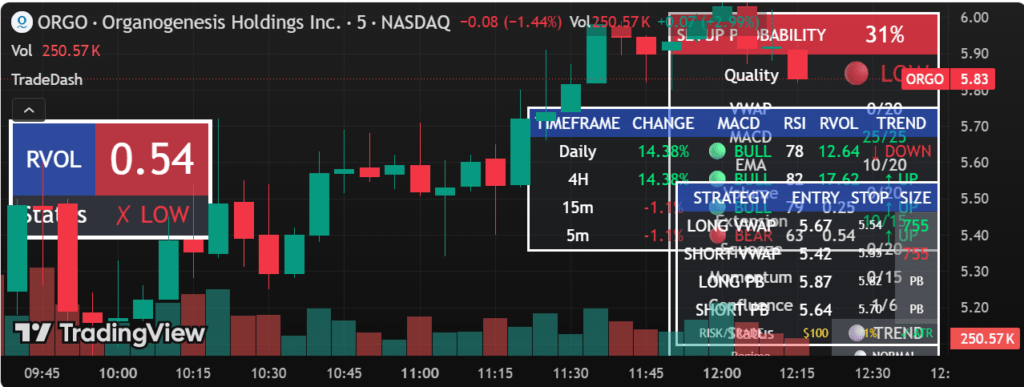
When most people think about TradingView, they immediately think about charts.
For good reason.
TradingView offers some of the best charting capabilities available to retail investors today.
The charts are:
- Fast
- Interactive
- Highly customizable
- Easy to understand
Even beginners can quickly learn to navigate the interface.
Why Charts Matter for Investors
Many investors believe charts are only useful for traders.
That is not entirely true.
Charts help investors:
- Visualize trends
- Understand market behavior
- Compare investments
- Analyze historical performance
For example:
Before investing in an ETF, you might want to see:
- How it performed during market downturns
- Long-term growth trends
- Relative performance versus other ETFs
TradingView makes this process simple.
Investors who want to understand how markets function can also explore the educational resources provided by the SEC Investor Education Center and FINRA Investor Education, both of which offer beginner-friendly investing guidance.
Multiple Timeframes
One feature that beginners often appreciate is the ability to view different timeframes.
Examples include:
- 1 Day
- 1 Week
- 1 Month
- 1 Year
- 5 Years
- Maximum Historical Data
This helps investors move beyond short-term noise and focus on long-term trends.
For readers interested in long-term investing strategies, also read:
Portfolio Diversification for Beginners
Technical Indicators Explained
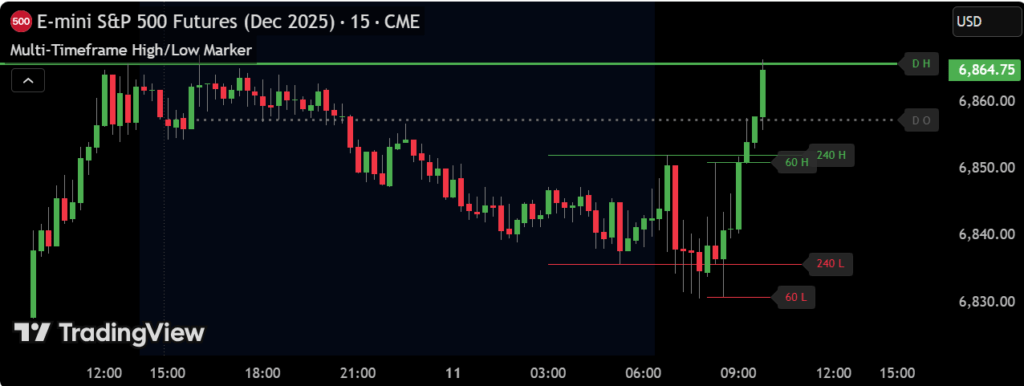
One of TradingView’s most powerful features is its enormous library of technical indicators.
The platform offers hundreds of indicators, including:
- Moving Averages
- RSI (Relative Strength Index)
- MACD
- Bollinger Bands
- Volume Indicators
At first, this may seem overwhelming.
The good news is:
Most beginner investors only need a few basic indicators.
Indicators Beginners Should Learn First
Moving Averages
Moving averages help smooth price fluctuations and reveal long-term trends.
They are among the easiest indicators to understand.
Volume
Volume shows how much buying and selling activity is occurring.
This helps investors understand market participation.
Relative Strength Index (RSI)
RSI helps identify whether an asset appears overbought or oversold.
While it should never be used in isolation, it can provide useful context.
For a deeper explanation of technical indicators such as RSI, MACD, and moving averages, the Investopedia Technical Analysis Guide provides excellent educational resources.
Important Reminder
Indicators should support decision-making.
They should not replace:
- Research
- Diversification
- Risk management
Successful investing is rarely based on a single indicator.
TradingView Stock Screener
One of the most valuable tools for self-directed investors is the TradingView Stock Screener.
Instead of manually reviewing thousands of stocks, the screener allows users to filter opportunities based on specific criteria.
Examples include:
- Market capitalization
- Revenue growth
- Dividend yield
- Price performance
- Sector
- Industry
Why Screeners Matter
Imagine searching for:
- Large-cap dividend stocks
- Growth companies
- Undervalued opportunities
Without a screener, this process could take hours.
TradingView reduces that process to minutes.
ETF Screening Capabilities
Many beginner investors focus on ETFs rather than individual stocks.
TradingView also allows users to analyze and compare ETFs efficiently.
This is particularly useful for readers who have already explored:
Watchlists: Organizing Your Investments
Another feature many investors underestimate is the Watchlist.
Watchlists allow you to create personalized collections of:
- Stocks
- ETFs
- Indices
- Cryptocurrencies
- Commodities
Instead of searching repeatedly for investments, everything remains organized in one location.
Example Beginner Watchlist
A beginner investor might track:
ETFs
- S&P 500 ETF
- Total Market ETF
- Dividend ETF
Stocks
- Apple
- Microsoft
- Amazon
Market Indicators
- S&P 500 Index
- Nasdaq 100
This creates a simple monitoring system.
TradingView Alerts
One of the most useful features for busy investors is Alerts.
Alerts allow TradingView to notify you when specific market conditions occur.
Examples:
- Price reaches a target level
- Indicator triggers a signal
- Trend changes
- New highs or lows occur
This eliminates the need to constantly watch charts.
Why Alerts Are Useful for Beginners
Many new investors spend too much time monitoring markets.
Alerts allow you to focus on your life while still staying informed.
This supports a healthier investing mindset.
For more on avoiding emotional investing, read:
How to Build a Strong Investment Mindset Before You Start Investing
TradingView Community
One feature that truly differentiates TradingView from competitors is its community.
Millions of users share:
- Market ideas
- Educational content
- Technical analysis
- Investing perspectives
For beginners, this creates valuable learning opportunities.
Benefits of the Community
You can:
- Observe experienced analysts
- Learn chart-reading techniques
- Explore different viewpoints
- Discover educational content
However, it is important to remember:
Not every published idea is correct.
Always conduct your own research.
TradingView Mobile App
Modern investors increasingly manage their portfolios on mobile devices.
Fortunately, TradingView offers one of the strongest mobile experiences available.
The app allows users to:
- View charts
- Monitor watchlists
- Receive alerts
- Analyze investments
- Follow market news
from virtually anywhere.
TradingView for Investors on the Go
For busy professionals and beginner investors who do not spend all day in front of a computer, the mobile app can be extremely useful.
The experience remains surprisingly similar to the desktop version.
Try TradingView Today
If you’re looking for a platform that combines:
✔ Professional charts
✔ Powerful screeners
✔ ETF analysis
✔ Market alerts
✔ Educational resources
✔ Beginner-friendly usability
TradingView is one of the strongest options available.
Try TradingView Here
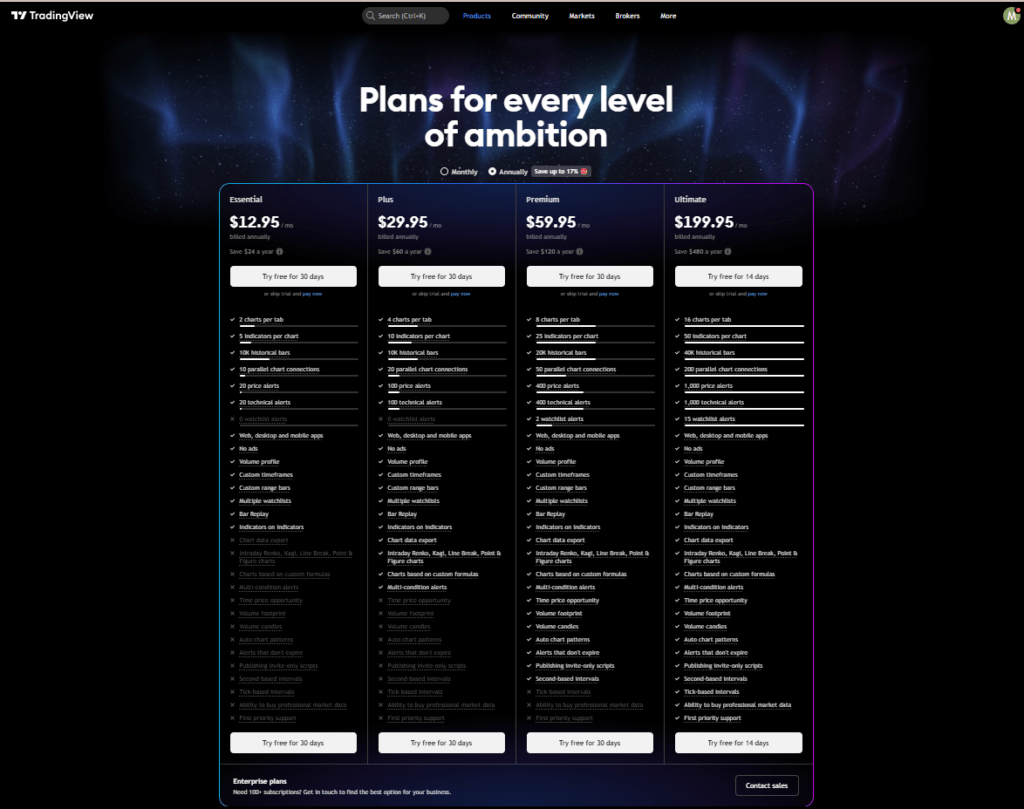
TradingView Pricing: Is the Paid Version Worth It?
One of the biggest questions investors ask before signing up is:
“Can I use TradingView for free, or do I need a paid plan?”
The good news is that TradingView offers a free version that is surprisingly powerful.
In fact, many beginner investors can comfortably use the platform for months before needing to upgrade.
However, understanding the differences between plans is important.
FREE TECHNICAL ANALYSIS STARTER GUIDE
No spam.
TradingView Free Plan
The free plan provides access to:
- Interactive charts
- Basic indicators
- Watchlists
- Community ideas
- Market analysis tools
For many beginners, this is more than enough to start learning.
If your goal is simply to:
- Learn chart reading
- Follow ETFs
- Monitor stocks
- Explore market trends
the free version is an excellent starting point.
Best For
✔ Complete beginners
✔ New investors
✔ ETF investors
✔ Learning technical analysis
TradingView Essential Plan
The Essential plan unlocks additional capabilities such as:
- More indicators
- More alerts
- Multiple chart layouts
- Enhanced customization
This plan is often sufficient for investors who actively monitor markets several times per week.
TradingView Plus Plan
The Plus plan expands flexibility even further.
Benefits include:
- More chart layouts
- Additional alerts
- Greater data capacity
- Enhanced workflow tools
This plan is typically suited for investors who have developed a more structured research process.
TradingView Premium Plan
The Premium plan is designed for power users.
Features include:
- Maximum alerts
- Advanced charting capabilities
- Faster updates
- Additional professional-level functionality
While impressive, most beginner investors do not need the Premium plan immediately.
TradingView Free vs Paid
Many readers ask:
“Should I upgrade immediately?”
For most beginner investors:
The answer is no.
Start with the free version.
Learn the platform.
Understand your investing process.
Upgrade only when the additional features solve a specific problem.
This approach helps avoid unnecessary expenses while still gaining access to one of the best investing tools available.
TradingView Pros and Cons
No platform is perfect.
A balanced TradingView Review should acknowledge both strengths and weaknesses.
TradingView Pros
Exceptional Charts
Among the best charting experiences available.
Beginner-Friendly Interface
Easier to learn than many professional platforms.
Massive Market Coverage
Stocks
ETFs
Forex
Cryptocurrencies
Commodities
Indices
Strong Community
Millions of users sharing ideas and educational content.
Powerful Free Version
The free plan offers substantial value.
Excellent Mobile App
One of the strongest mobile investing experiences available.
TradingView Cons
Can Feel Overwhelming Initially
Beginners may feel intimidated by the number of available features.
Premium Plans Can Become Expensive
Advanced plans may not be necessary for most investors.
Community Content Varies in Quality
Not every market idea is useful or accurate.
Always perform independent research.
Some Data Requires Additional Subscriptions
Depending on the market and exchange, additional data fees may apply.
Real Beginner Investor Use Cases
One reason TradingView stands out is its versatility.
Let’s look at practical examples.
Scenario 1: ETF Investor
Goal:
Build a diversified ETF portfolio.
TradingView helps by:
- Comparing ETF performance
- Monitoring trends
- Tracking portfolio holdings
This complements the concepts discussed in:
Portfolio Diversification for Beginners
Scenario 2: New Stock Investor
Goal:
Research individual companies.
TradingView helps by:
- Analyzing charts
- Monitoring watchlists
- Tracking performance
Scenario 3: Long-Term Wealth Builder
Goal:
Invest consistently for years.
TradingView helps by:
- Monitoring markets
- Tracking investments
- Supporting informed decisions
This aligns closely with:
10 Smart Ways You Can Build Wealth in Today’s Economy
TradingView vs Finviz
TradingView and Finviz are often compared.
However, they serve slightly different purposes.
TradingView
Strengths:
- Charts
- Alerts
- Visual analysis
- Community
- Multi-asset coverage
Finviz
Strengths:
- Stock screening
- Fundamental filters
- Market heatmaps
- Opportunity discovery
Which Is Better?
For charting:
TradingView wins.
For screening:
Finviz wins.
Many experienced investors use both platforms together.
TradingView vs TrendSpider
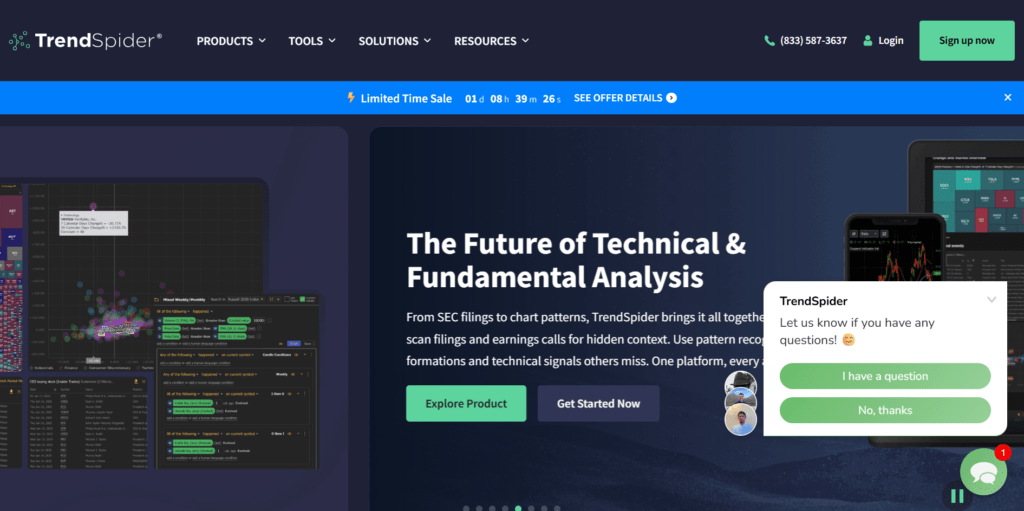
TrendSpider focuses heavily on automation.
It offers:
- Automated technical analysis
- Automated trendlines
- Automated pattern recognition
TradingView emphasizes:
- Flexibility
- Visualization
- Community learning
Which Is Better For Beginners?
For most beginners:
TradingView is easier to learn.
TrendSpider becomes more attractive as investors become comfortable with technical analysis and automation.
TradingView vs Finviz vs TrendSpider
| Feature | TradingView | Finviz | TrendSpider |
|---|---|---|---|
| Charts | ⭐⭐⭐⭐⭐ | ⭐⭐⭐ | ⭐⭐⭐⭐⭐ |
| Stock Screening | ⭐⭐⭐⭐ | ⭐⭐⭐⭐⭐ | ⭐⭐⭐⭐ |
| ETF Analysis | ⭐⭐⭐⭐⭐ | ⭐⭐⭐ | ⭐⭐⭐⭐ |
| Automation | ⭐⭐ | ⭐⭐ | ⭐⭐⭐⭐⭐ |
| Ease of Use | ⭐⭐⭐⭐⭐ | ⭐⭐⭐⭐ | ⭐⭐⭐ |
| Beginner Friendly | ⭐⭐⭐⭐⭐ | ⭐⭐⭐⭐ | ⭐⭐⭐ |
| Mobile Experience | ⭐⭐⭐⭐⭐ | ⭐⭐ | ⭐⭐⭐ |
| Community Features | ⭐⭐⭐⭐⭐ | ⭐ | ⭐ |
| Free Plan | ⭐⭐⭐⭐⭐ | ⭐⭐⭐⭐ | ⭐⭐ |
Which Platform Should You Choose?
Choose TradingView If:
- You want the best charts.
- You’re a beginner investor.
- You invest in ETFs.
- You want a platform that grows with you.
Choose Finviz If:
- You focus heavily on stock screening.
- You prefer fundamental analysis.
- You want to discover investment opportunities quickly.
Choose TrendSpider If:
- You want automation.
- You use technical analysis extensively.
- You prefer AI-assisted chart analysis.
Related Reviews
Our Recommendation For Most Beginners
TradingView remains the easiest recommendation for beginner investors because it offers the strongest combination of:
✔ Ease of Use
✔ Educational Value
✔ Charting Power
✔ ETF Analysis
✔ Long-Term Investing Support
Who Should NOT Use TradingView?
TradingView may not be ideal if:
- You want fully automated investing
- You dislike market research
- You never intend to analyze investments
In those situations, simpler investment approaches may be more appropriate.
However, for investors interested in learning and improving their understanding of markets, TradingView remains one of the strongest options available.
Is TradingView Worth It in 2026?
After evaluating:
- Features
- Ease of use
- Educational value
- Market coverage
- Pricing
- Flexibility
our conclusion is clear.
TradingView Rating
9.5 / 10
TradingView remains one of the best investing tools available for beginner investors.
Its combination of:
- Professional charts
- Educational resources
- Research tools
- Community insights
creates a platform that can grow alongside your investing journey.
Whether you’re analyzing ETFs, monitoring stocks, or simply learning how markets work, TradingView offers exceptional value.
Start Using TradingView
If you’re ready to improve your market analysis skills and gain access to one of the most powerful investing platforms available, TradingView is worth exploring.
Try TradingView Here
Why We Recommend It
✔ Beginner-friendly
✔ Powerful free plan
✔ Excellent charts
✔ ETF analysis
✔ Market research
✔ Long-term investing support
FAQ
Is TradingView free?
Yes.
TradingView offers a free plan that is suitable for many beginner investors.Is TradingView good for beginners?
Yes.
Its intuitive interface and educational resources make it one of the most beginner-friendly charting platforms available.Can I use TradingView for ETFs?
Absolutely.
TradingView supports ETF analysis, comparison, and monitoring.Is TradingView better than Finviz?
For charting, yes.
For stock screening, Finviz remains extremely strong.
Many investors use both platforms together.Is TradingView better than TrendSpider?
For beginners, TradingView is generally easier to learn.
TrendSpider excels in automation and advanced technical analysis.Is the Premium plan worth it?
Most beginners can start with the free version and upgrade later if additional features become necessary.
Final Thoughts
TradingView has earned its reputation for a reason.
It successfully combines professional-level tools with an experience that remains accessible to beginner investors.
While no platform is perfect, TradingView provides one of the strongest combinations of:
- Functionality
- Education
- Usability
- Value
available today.
For readers serious about improving their investing knowledge and market analysis skills, TradingView is a platform worth exploring.
Want More Investing Tools and Beginner-Friendly Guides?
Join the InvestSmartEdge newsletter and receive:
✔ Investing education
✔ Wealth-building strategies
✔ Platform reviews
✔ Beginner investing guides
✔ Market insights
Directly in your inbox.
FREE TECHNICAL ANALYSIS STARTER GUIDE
No spam.
Author:
Mario Cazombo
Mario Cazombo is the founder of InvestSmartEdge and a financial education writer focused on helping beginner investors learn investing with more confidence and less confusion.
His work covers investing, personal finance, wealth building, investing psychology, and investing tools.
Disclaimer
Invest Smart Edge provides educational content for informational purposes only and does not provide investment, legal, tax, or financial advice.
All investments involve risk, including the possible loss of principal. Past performance does not guarantee future results.
Always conduct your own research and consider consulting a qualified financial professional before making investment decisions